
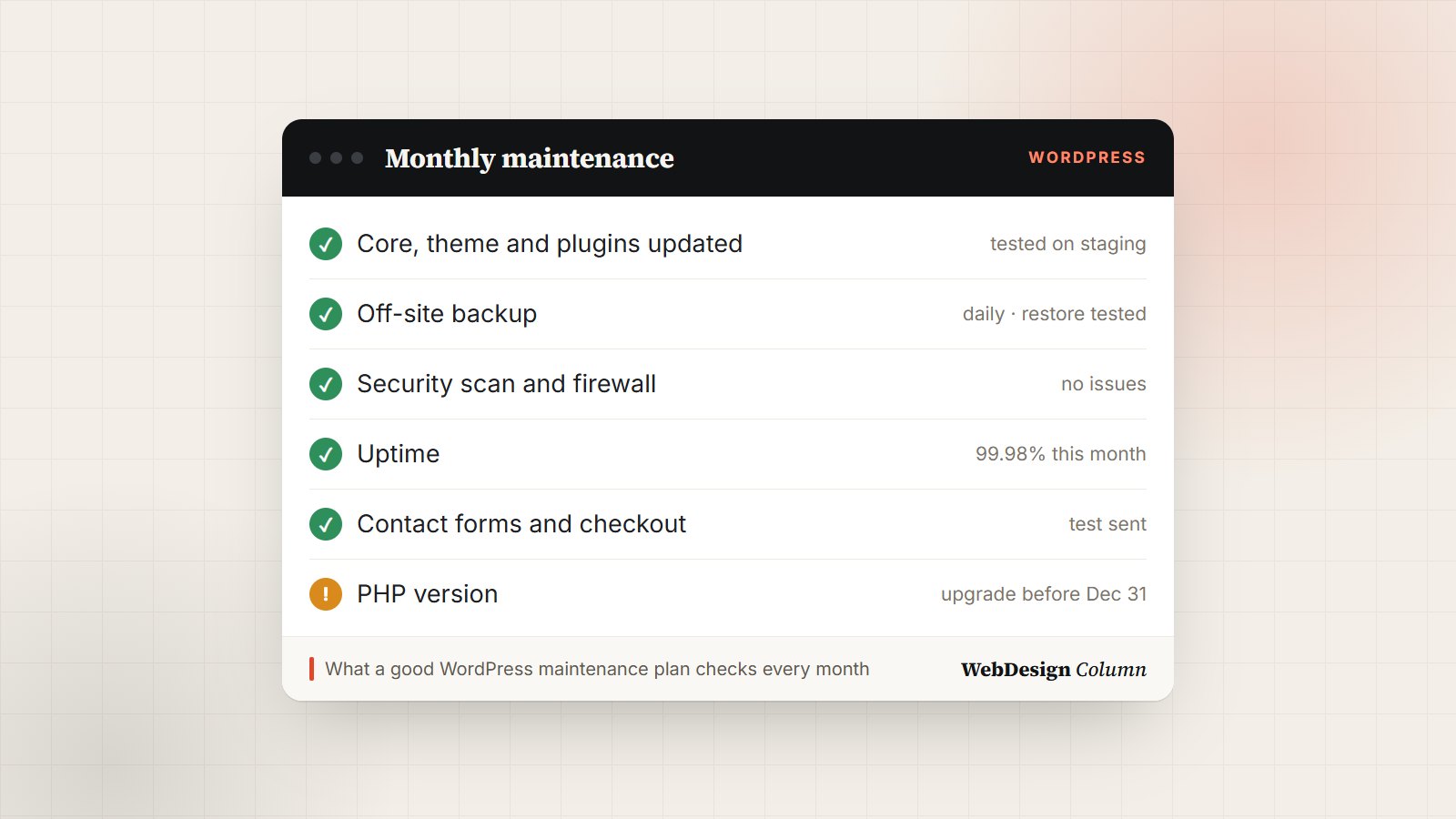
Most WordPress sites don’t break all at once. They wear down. A plugin goes two versions behind, a backup quietly stops running, a contact form starts dropping messages, and nobody notices until a customer mentions it. WordPress maintenance services exist to catch those things early, and a good plan costs a lot less than fixing a hacked or broken site.
This guide covers what a maintenance plan should include, what it typically costs, and the questions that separate a careful provider from one that just clicks “Update all” once a month.
Key takeaways
- Maintenance means updates, off-site backups, security and uptime monitoring, and regular checks that forms, checkout and speed still work.
- Typical plans run from about $50 a month for a small brochure site to $300 or more for an online store. The difference is mostly testing, response time and how much support is included.
- Before you sign up, ask how updates are tested and when a backup was last restored. The answers tell you more than the price.
What WordPress maintenance actually covers
WordPress itself, your theme and every plugin are maintained by different people on different schedules. Each update can fix a security hole, and each one can also clash with something else on your site. Maintenance is the routine of keeping all those parts current without breaking anything, plus making sure that if something does go wrong, you can get back to a working site quickly.
Security is the main reason it matters. Companies that track WordPress vulnerabilities, such as Patchstack and Wordfence, report the same pattern every year: the large majority of problems are found in plugins and themes, not in WordPress core. An out-of-date plugin is one of the most common ways small sites get hacked.
 FreeHTML
 FreeHTML
 FreeHTML
 FreeHTML

 FreeHTML
 FreeHTML
 FreeHTML
 PremiumElementor
 FreeHTML
 PremiumElementor
What a good maintenance plan includes
1. Updates that are tested, not just installed
Core, theme and plugin updates should go onto a copy of the site first (a staging site), get checked, and only then go live. Security fixes may need to be applied within a day or two. Feature updates can usually wait a week, until other sites have found the bugs.
2. Backups stored somewhere else, and restore tests
Daily backups of the files and the database, kept off the server (cloud storage, not the same hosting account), with at least 30 days of history. A backup you have never restored is a hope, not a backup. Good providers restore one to a test site every few months to prove it works.
3. Security monitoring
A firewall, malware scans, alerts for new admin accounts, and a check that only the people who need access still have it. Former staff and old agency logins are a common blind spot.
4. Uptime monitoring
A service that checks your site every few minutes and alerts someone when it goes down, so you hear about an outage from your provider and not from a customer.
5. Checks that the important parts still work
After updates and caching changes, someone should send a test through every form, place a test order if you sell online, and look at the pages that bring in money. A site can look perfect and still be losing every enquiry.
6. Speed and Core Web Vitals
A monthly look at load times and Google’s Core Web Vitals, image sizes, and caching. Sites get slower over time as plugins and content pile up.
7. Hosting and PHP upkeep
WordPress runs on PHP, and each PHP version only gets security fixes for a limited time. Your provider should know which version your server runs, when its support ends, and plan the upgrade before plugins start refusing to update.
8. A short monthly report and some support time
What was updated, what was fixed, uptime for the month, and anything that needs a decision from you. Many plans also include 30 to 60 minutes of small changes, like editing text, swapping an image or adding a page.
From experience: when we relaunched WebDesignColumn in November 2026, two routine maintenance checks caught real problems on launch day. A Contact Form 7 update refused to install because the server was still on PHP 8.2 and the new version needs 8.3. And after we turned on page caching, our contact form’s spam filter stopped working, because it relied on a timestamp that the cache kept serving from hours earlier. Neither showed up as an error. Both were only found because someone tested the forms after the change.
How much WordPress maintenance costs
Prices vary a lot, but published plans from freelancers and agencies in the US fall roughly into these bands:
| Option | Typical cost | What you usually get |
|---|---|---|
| Do it yourself | $0–$30 a month | Your time, a backup plugin or service, a security plugin, a free uptime monitor |
| Freelancer | $50–$150 a month | Updates, backups, monitoring, a little support time; response depends on one person’s schedule |
| Agency plan | $100–$300 a month | Tested updates on staging, off-site backups, security, uptime alerts, monthly report, support hours |
| Online store or busy site | $300–$1,000+ a month | All of the above plus checkout testing, faster response times, performance work and more support |
What pushes the price up
- WooCommerce or memberships. Checkout and account pages need testing after every update, and downtime costs real money.
- Number of plugins. Forty plugins means forty things that can conflict.
- Response time. “Fixed within four hours” costs more than “next business day”.
- Support hours. Content edits and small changes are often the biggest part of the bill.
- Custom code. A custom theme or plugin needs someone who can read and fix it.
Should you do it yourself?
For a small brochure site with a handful of plugins, doing it yourself is realistic if you set aside about an hour a month and follow the same steps every time. It stops making sense when the site takes payments, when downtime would cost you leads, or when nobody on your team is comfortable restoring a backup under pressure.
If you do it yourself, the minimum is: an automatic off-site backup, a security plugin, a free uptime monitor, updates once a week (security fixes sooner), and a test of every form after you update.
How to choose a maintenance provider
Questions to ask before you sign
- How are updates tested? You want to hear “on a staging copy first”, not “we update and check the homepage”.
- Where are backups stored, and when did you last restore one? Off-site, with a recent restore test.
- What happens if the site is hacked? Is clean-up included, or billed by the hour?
- How fast do you respond when the site is down? Get a number of hours, in writing.
- Who owns the logins and the backups? You should, and you should be able to leave without losing either.
- What’s in the monthly report? Ask to see a sample.
Red flags
- Backups stored only on the same server as the site.
- “Unlimited” everything for $20 a month.
- No mention of testing, only “updates”.
- A long contract with no clear way to cancel or take your site with you.
Want it handled?
Get WordPress maintenance from people who test before they update.
Our partner agency Plugig Solutions maintains WordPress sites for growing businesses: tested updates, off-site backups, security and uptime monitoring, and a clear monthly report. Tell them about your site and get a quote.
Frequently asked questions
How often should a WordPress site be updated?
Check for updates at least once a week. Apply security fixes within a day or two of release, and give larger feature updates a few days so early bugs get found and fixed first. Always test forms and checkout afterwards.
Is my hosting company already doing this?
Partly. Many hosts update WordPress core automatically and keep their own backups, but few test plugin updates, check your forms or restore a backup on request within your timeline. Read your plan’s details and treat host backups as a second copy, not the only one.
What’s the difference between maintenance and support?
Maintenance is the routine work that keeps the site healthy: updates, backups, monitoring. Support is help with changes you ask for, like new pages or design tweaks. Most plans include a small amount of support time and bill extra work by the hour.
Can I cancel a maintenance plan and keep my site?
You should be able to. Before signing, confirm that you own the hosting account, the domain and the admin logins, and that the provider will hand over the latest backup if you leave.











Leave a Reply