
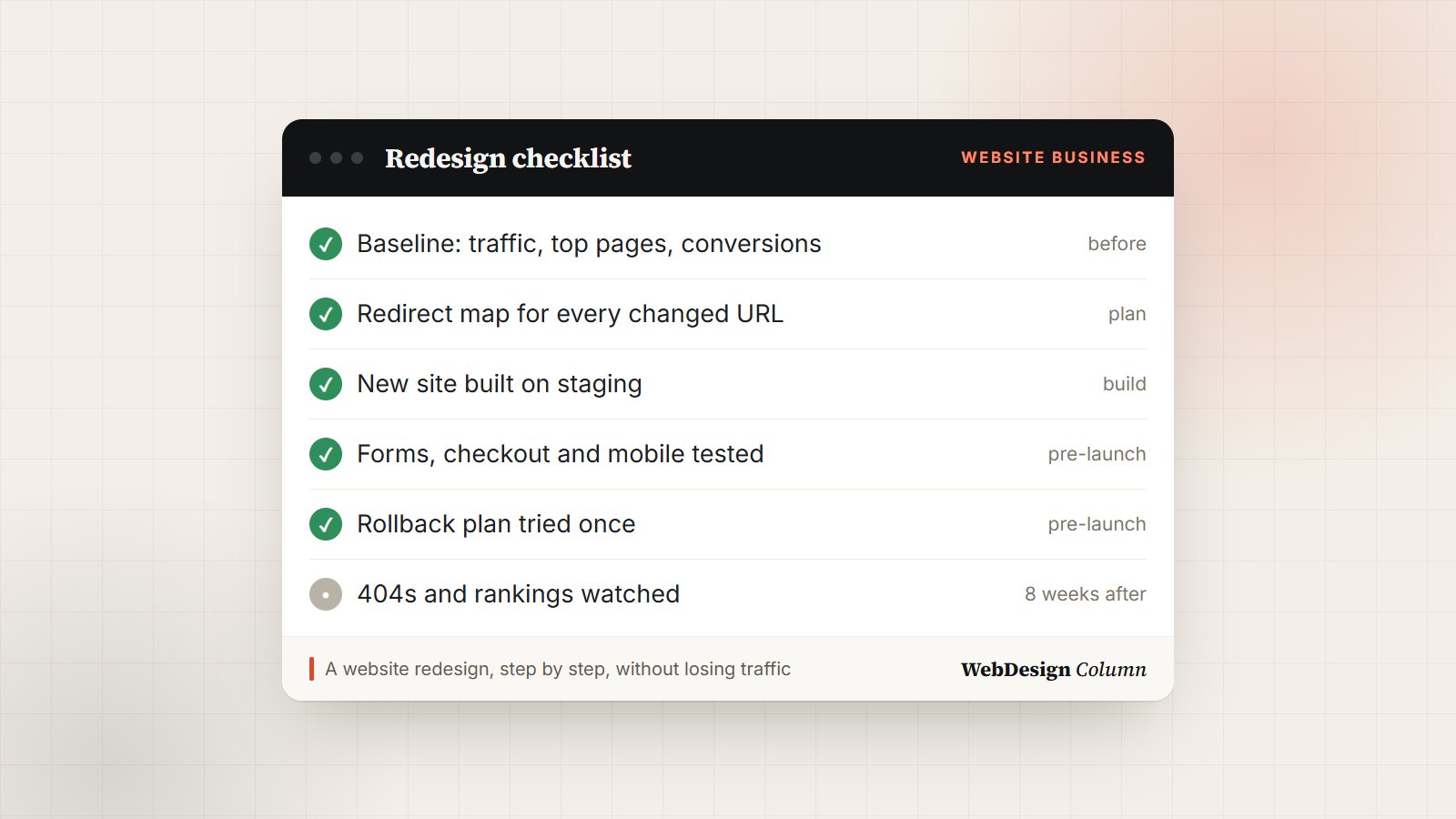
A redesign is the one project that can make a website better and worse at the same time. The new design looks great, and three weeks later traffic is down by half because a few hundred old URLs now lead nowhere. Almost every redesign problem I’ve seen comes from something that was skipped, not something that was done badly.
This checklist walks through a redesign in order: what to measure first, what to plan, what to check before launch, and what to watch afterwards. Use it for your own project, or hand it to whoever you hire and check their work against it.
Key takeaways
- Record your current traffic, rankings and conversions before you change anything. Without a baseline you can’t tell whether the redesign worked.
- Every URL that changes needs a 301 redirect to its closest new page. This single step protects most of your search traffic.
- Launch with a way back: a full backup and a tested plan to restore the old site in minutes.
1. Before you start: measure what you have
Take a snapshot of the current site. You’ll compare against it after launch, and it shows you which pages you can’t afford to break.
Baseline
- Traffic: visits per month for the last 12 months, from your analytics.
- Top pages: the 20 to 50 pages that get the most visits and the most search clicks (Google Search Console, Performance report).
- Search queries: the terms you already rank for, with their positions.
- Conversions: form sends, calls, sign-ups or sales per month.
- Every URL: a full crawl of the site (Screaming Frog’s free version handles up to 500 URLs) saved as a spreadsheet.
- Speed: Core Web Vitals for the home page and two or three key pages.
 FreeHTML

 FreeHTML
 FreeHTML
 FreeHTML
 PremiumAstro
 FreeHTML
 FreeHTML
 PremiumNext.js
 FreeHTML
 FreeHTML
2. Plan: goals, content and URLs
Write down why you’re redesigning in one or two sentences, with a number if you can: “more quote requests from the website” is a goal, “a fresh look” isn’t. Then decide what the new site needs to hold before anyone opens a design tool.
Planning
- Goal and target number agreed with whoever signs off.
- Content inventory: for each existing page, keep, update, merge or remove.
- New site map: the pages and menu structure of the new site.
- Redirect map: a spreadsheet with every old URL in one column and its new URL in the next. Removed pages point to the closest relevant page, not the home page.
- Real content first: draft the main pages before the design is finished, so the design fits the words and not lorem ipsum.
- Budget, timeline and approvals: who reviews what, and by which date.
3. Design and build on a staging site
Build the new site on a private copy (a staging site) that search engines can’t see. Keep it password-protected or set to noindex, and make sure it can’t send real emails to customers while you test.
- Design for phones first; for most small-business sites, more than half of visitors are on mobile.
- Check color contrast, heading order, alt text and keyboard navigation as you go, not at the end.
- Keep page titles and meta descriptions for pages that already rank, unless you have a reason to change them.
- Set up analytics and conversion tracking on the new site before launch, not after.
4. Pre-launch checks
The week before launch
- Redirects: every row of the redirect map tested; old URLs return 301 and land on the right page.
- Forms: each form sends, the email arrives, and spam protection still works.
- Checkout (if you sell): a real test order, start to finish.
- Mobile: every template checked on a real phone, not just a resized browser.
- Links: no broken internal links; no links still pointing at the staging address.
- SEO basics: unique titles and descriptions, one H1 per page, XML sitemap ready, and the staging “noindex” setting removed for the live site.
- Speed: Core Web Vitals no worse than the baseline.
- Rollback plan: a full backup of the old site, and steps to put it back that someone has actually tried.
5. Launch day
- Launch early in the week, at your quietest hour. Never on a Friday.
- Take a final backup of the old site.
- Switch to the new site, clear every cache (plugin, server and CDN).
- Re-test the top pages, every form and a sample of redirects on the live address.
- Submit the sitemap in Google Search Console and Bing Webmaster Tools, and request indexing for your most important pages.
6. After launch: the first eight weeks
Some movement in rankings during the first few weeks is normal while search engines re-crawl the site. What you’re watching for is anything that doesn’t recover.
- Weekly: 404 errors in Search Console or your redirect plugin’s log; add a redirect for anything that used to exist.
- Weekly: clicks and positions for your top queries compared with the baseline.
- After a month: conversions compared with the baseline. This is the number that tells you whether the redesign paid off.
- After two weeks of stability: remove the old site’s files and backups from the server, keeping one archived copy offline.
From experience: we redesigned WebDesignColumn itself in the autumn of 2026. The build and testing took about a week. The launch then slipped by five weeks, because the final review and sign-off had no date attached. What protected us on launch day was planning that’s easy to skip: a redirect map for every changed URL, posts we weren’t happy with kept out of search until they were rewritten, and the old site kept in place so we could switch back in seconds if anything went wrong.
Common redesign mistakes
- Redirecting everything to the home page. Search engines treat that like a missing page, and visitors land somewhere useless.
- Cutting content that ranked. A shorter, prettier page can lose the very text that brought visitors in.
- Launching with the staging noindex still on. It happens more often than anyone admits, and it can drop a site out of Google within days.
- Forgetting tracking. If analytics isn’t on the new site from day one, you lose the comparison you set up in step 1.
- Approvals without dates. Reviews stretch from days into weeks unless someone owns a deadline.
Planning a redesign?
Redesign without losing the traffic you already have.
Our partner agency Plugig Solutions handles redesigns end to end: audit, redirect map, build on staging, launch and the weeks after. Tell them about your site and get a clear quote.
Frequently asked questions
How long does a website redesign take?
For a small business site of 10 to 30 pages, six to twelve weeks is typical: one or two for the audit and plan, three to six for design and build, and one or two for content, testing and launch. Content and approvals are usually what takes longest.
Will a redesign hurt my SEO?
It doesn’t have to. Rankings often move for a few weeks while Google re-crawls the site. If every changed URL redirects to its closest new page, and the content that ranked is kept or improved, traffic usually recovers and then grows.
How often should a website be redesigned?
Most business sites benefit from a visual refresh every three to four years, with content and speed improvements in between. Redesign sooner if the site is hard to update, slow on phones, or no longer matches what you sell.
Should I keep my URLs the same?
Keep them where you can, especially for pages that rank. Change them when the old ones are messy or include a year that will date the page, and redirect every old URL with a 301.








Leave a Reply